
Picture an association whose members gather at the same café after every meeting. The owner already lends the back room for the AGM and puts out tea at the autumn fundraiser. One evening the owner asks the organiser a fair question: could the café help with the group chat too? Until now there was no clean answer to that. We built the sponsor tile so there is one, and it comes with rules every member can read.
Who pays for a group chat today
Someone always pays. Most free messaging apps are funded by advertising, by data about how people use them, or by a larger company with its own reasons to keep them running. Others run on donations and goodwill, and that’s an honest model too.
Then there’s the organiser’s own pocket. We hear it again and again from the people we talk to: the treasurer covers a mailing tool from their own card, the chair pays for extra storage, and nobody notices until that person steps down and the bill lands on someone else. Nobody did anything wrong there. There’s just no plan the next committee can pick up.
Our view: if a room costs money to run, the people in it should know who pays for it and what that payer gets back. In WLP Chat there’s no ad tracking behind the scenes, so the answer is always one of two names, the organisation or a sponsor the organiser chose.
How a sponsor tile works
A sponsor tile is one labelled card on that room’s Home, the screen members see when they open the room. One room, one tile, at most.
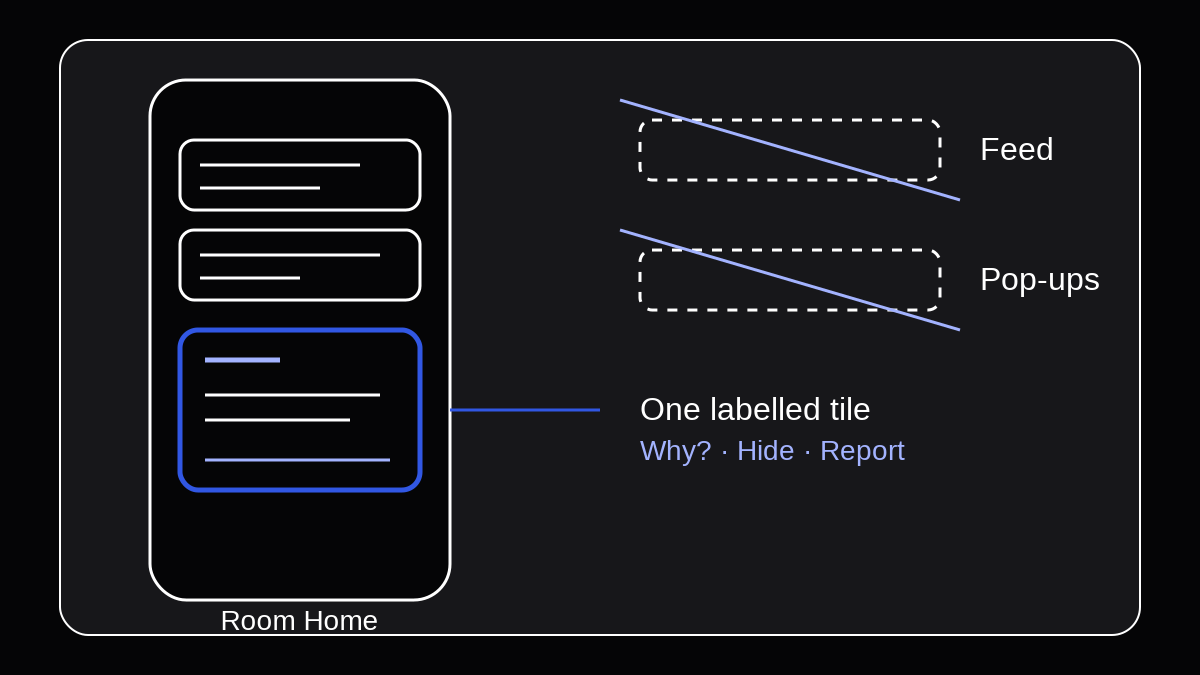
That’s the whole format. There’s no feed of offers, no pop-ups between messages, and the sponsor can’t send messages to anyone. The tile sits on Home and stays there. It doesn’t follow members into the conversation, and it doesn’t change based on what anyone writes.
So a café’s tile might carry its name, one line about an autumn menu for association members, and a link. If a member never opens Home, they’ll never see it. We’d rather the sponsor get a little less attention than have members feel watched in their own room.
What members see and can do
The tile carries the word Sponsored above the sponsor’s name, so nobody mistakes it for a notice from the organiser about the next meeting.
Under it there are three small actions. Why? explains how the sponsor got there: the organiser chose them for this room, and it was never picked from anyone’s messages or activity. Hide removes the tile from that member’s Home. Report sends it to platform safety, who deal with sponsor complaints so the volunteer organiser doesn’t have to argue with a business on a Tuesday night.
A member who dislikes the whole idea can press Hide and carry on with the chat. We don’t count that against the room or the sponsor, and nobody is told who hid it.
What the sponsor gets
The sponsor gets view and tap counts for the room. That’s it. They never get a list of members, never see a room identity, and can’t find out who tapped. The counts are only released once there are at least 20 events, so in a small room nobody can work backwards to one person.
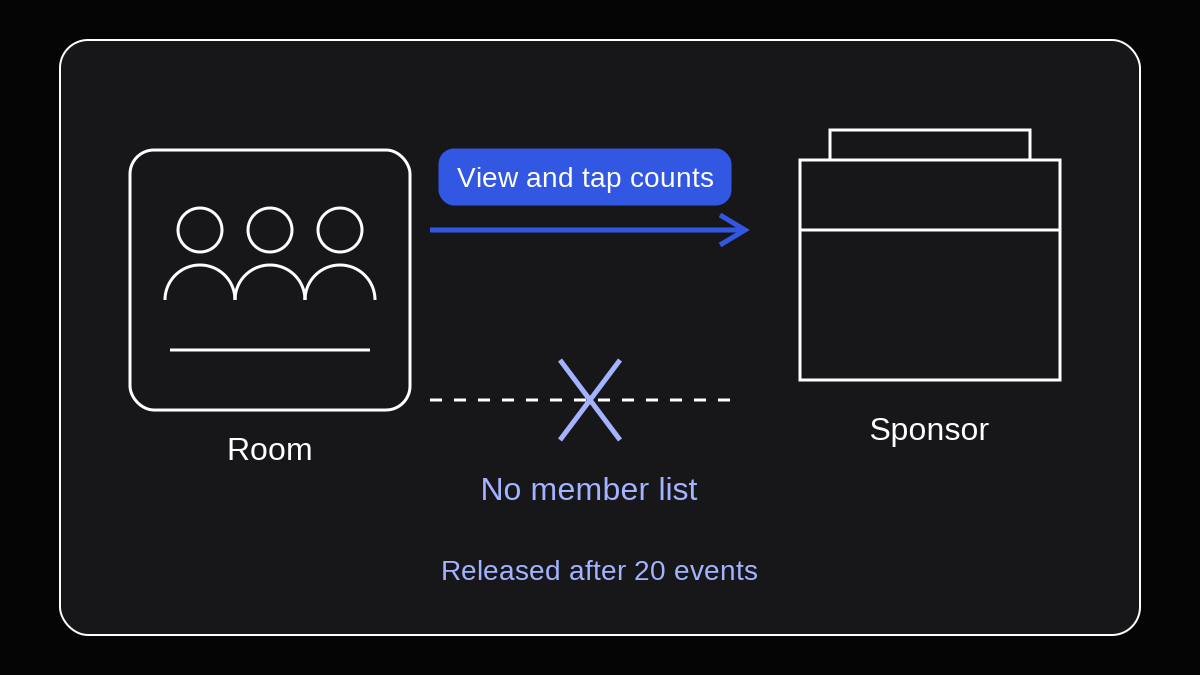
The link is clean. When a member taps it, the app shows the address first, and it adds nothing that identifies them. A local sponsor won’t get targeting out of this, and that’s deliberate. What they do get is their name in front of the association they already back, with the members knowing exactly why it’s there.
If you run a business and want the full rules, the page to read is sponsor a community room.
What the organiser decides
The organiser picks the sponsor. We don’t place one in a room, and a business can’t buy its way into a room it wasn’t invited to.
Some categories never run, whoever asks: gambling, adult content and politics are out. So are crypto and risky finance. The organiser can’t make an exception, and neither can we.
Our rule of thumb for organisers is to choose a sponsor the members already know by name. The bakery that does the Christmas order. The café with the back room. If you’d feel awkward explaining the choice at the AGM, it’s the wrong one, and it’s better to run the room without a sponsor than with one people grumble about.
FAQ
Is a room with a sponsor tile free for members?
Yes. Members use WLP Chat free, whether or not their room has a sponsor. The sponsor pays for the room, not for access to people, and we don’t publish prices for either side yet.
Can a room have no sponsor?
Yes, and plenty of organisers will prefer that. The organisation can pay for its rooms instead, and then Home shows no sponsor tile at all.
Asking about a sponsor for your room
A room is paid for by its organiser or by one local sponsor, and the price depends on the room. If a business your members already use might back yours, tell us about your group and we’ll send you a price and talk it through. The sponsors page has the rules every sponsor accepts.
If you organise a group of 50 to 500 adults, get started and we’ll reply within two working days.